Guides· 11 min read· Dishment team
Restaurant inventory management: how to set up stock control (with an Excel template)
How to set up restaurant inventory management in 7 steps: an ingredient list, documents, a stock ledger, an Excel template, average cost and reorder levels, with AZN examples.
Month end, stock take: on paper there should be 20 kg of rice, on the shelf there are 14. Where did six kilograms go? Spoiled, portions too big, or someone took it home? Without proper restaurant inventory management there is no answer. With it, you can trace the gap to a day, a document and even a dish.
This is a practical guide for a restaurant, cafe or tea house, with examples from Baku: 7 steps, the documents you need, a stock ledger example, an Excel template, average cost and reorder levels. All figures are in AZN and are illustrative.
What restaurant inventory management is, and why it matters
Inventory management means tracking what comes into the store room, what is used and what is left, backed by documents. The logic fits into one formula:
Closing stock = opening stock + deliveries − usage − write-offs − transfers
Stock calculated this way is "theoretical". Stock found when you count is "actual". The gap between them is one of the most valuable numbers in a restaurant: it reveals waste, theft, oversized portions and unrecorded write-offs.
It matters for three reasons:
- Food cost. To know what a plov really costs, you need the real purchase price and usage of rice and meat. See our food cost calculation guide.
- Control. Without records, losses are invisible. When every movement has a document, stock stops "evaporating".
- Ordering. You know what runs out when, and you don't run out of rice on a Friday night.
How to set up inventory control: 7 steps
1. Build an ingredient list
One line per product: code, name, unit (kg, l, piece), category. Choose the unit once and stick to it. If oil is logged in litres one day and "tins" the next, stock will never reconcile. And don't give one product two names: if "beef" and "beef tenderloin" are different items, give them different codes.
2. Assign storage areas and an owner
Dry store, fridge, freezer, bar. Each area needs one person responsible: a storekeeper or, in a small venue, the manager or head chef. When everyone has the key, nobody is accountable.
3. Do an opening count
Records start from actual stock, not from zero. Weigh and count everything and write down each item's purchase price. That is your first opening stock.
4. Tighten up deliveries
When goods arrive:
- weigh them and check the weight against the invoice;
- check quality and use-by dates, and the temperature of chilled goods;
- enter the invoice number, supplier, quantity and price the same day.
Goods accepted without an invoice don't exist in your records; later they show up as a "surplus" or not at all.
5. Record usage by recipe card
The kitchen turns ingredients into dishes. With a recipe card for every dish (gross weight, waste %, net weight), you can work out how much should have been used from the portions sold. Say 280 portions of plov were sold in a week and the card says 110 g of rice per portion: theoretical usage is 30.8 kg. See our recipe card template.
6. Document write-offs and transfers
Spoiled, expired or dropped food is written off with a write-off record. Stock sent to another branch or from the store room to the bar moves with a transfer document. Any movement without a document becomes an unexplained gap at the count. There is a template in food write-offs in restaurants.
7. Count regularly and investigate the gaps
Count expensive and perishable items (meat, fish, butter, alcohol) weekly and the rest monthly. Compare theoretical and actual stock and investigate gaps by category. How to run the count itself is in our restaurant inventory count guide.
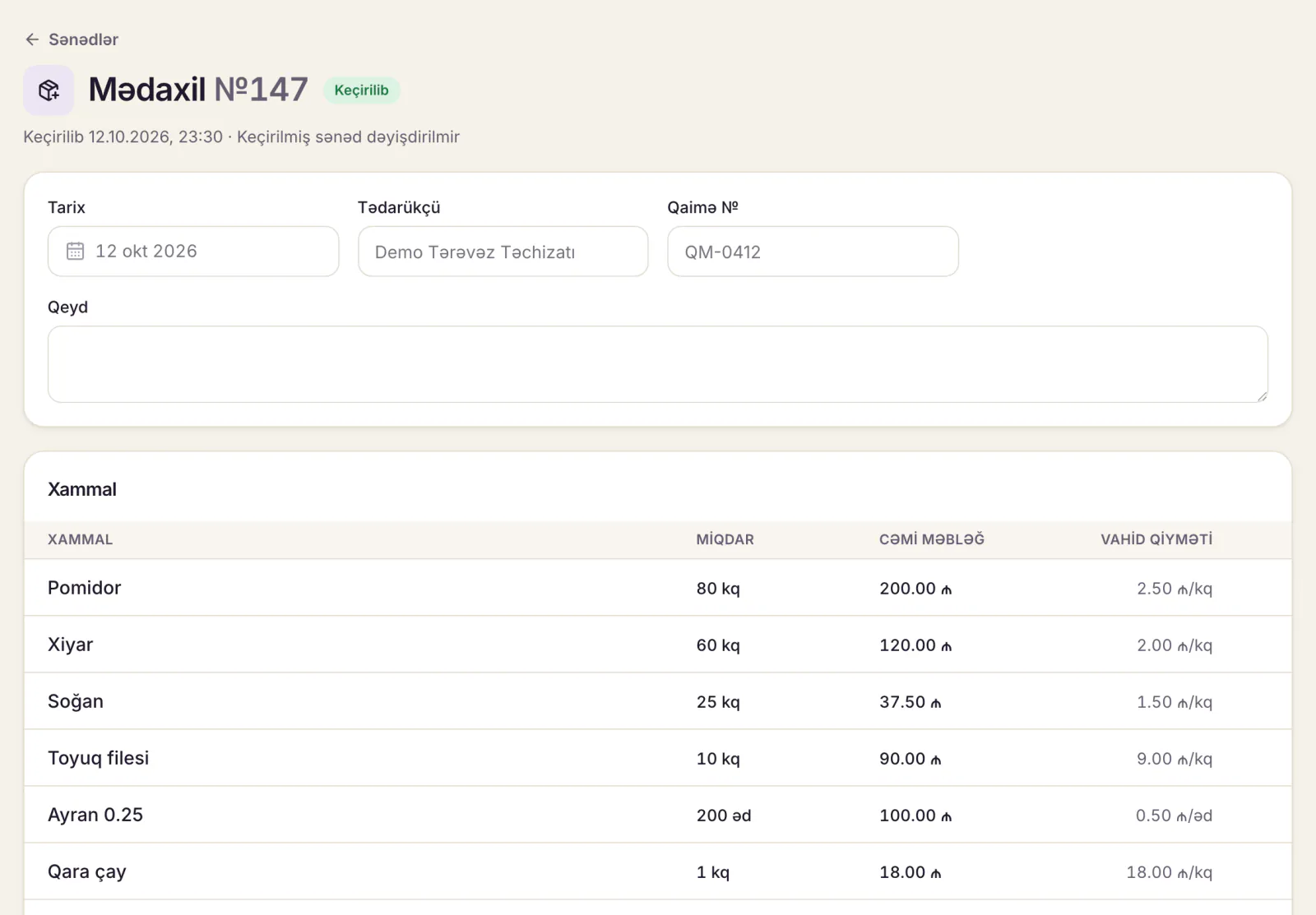
What stock control is based on: documents
In short: source documents. No movement in the store room should happen without one. The main documents for a restaurant:
| Document | When | Who prepares it |
|---|---|---|
| Supplier invoice (electronic invoice) | Every delivery | Supplier; the receiver checks it |
| Goods received note | Every delivery | Storekeeper or manager |
| Usage from sales (by recipe card) | Daily | Automatic or the manager |
| Transfer note | Store room to bar, between branches | Sender and receiver |
| Write-off record | Spoilage, loss | Cook; manager approves |
| Stock count sheet | Every count | Count team |
| Recipe card | When a dish goes on the menu | Head chef |
In Azerbaijan a supplier registered with the tax authority will usually send you an electronic invoice (elektron qaimə-faktura) through e-taxes.gov.az. How these documents are reflected in your accounts and how long to keep them is a question for your accountant; this article is about running the store room day to day.
A stock ledger example
A classic stock ledger is a separate card for each product: one line per movement, with the balance in the last column. A week of rice:
| Day | Document | In, kg | Out, kg | Balance, kg | Price, AZN/kg |
|---|---|---|---|---|---|
| 1 | Opening stock | 20.0 | 3.20 | ||
| 3 | Invoice #145, supplier A | 25.0 | 45.0 | 3.40 | |
| 1–7 | Usage from sales (280 portions of plov) | 30.8 | 14.2 | ||
| 5 | Write-off #7 (damp) | 1.5 | 12.7 | ||
| 7 | Stock count: actual 12.0 kg | 0.7 | 12.0 |
The 0.7 kg in the last line is an unexplained gap: portions above the card, unrecorded staff meals or theft. Under a kilo looks small, but the same percentage on meat and butter is hundreds of manat a month. See restaurant theft prevention for where to look.
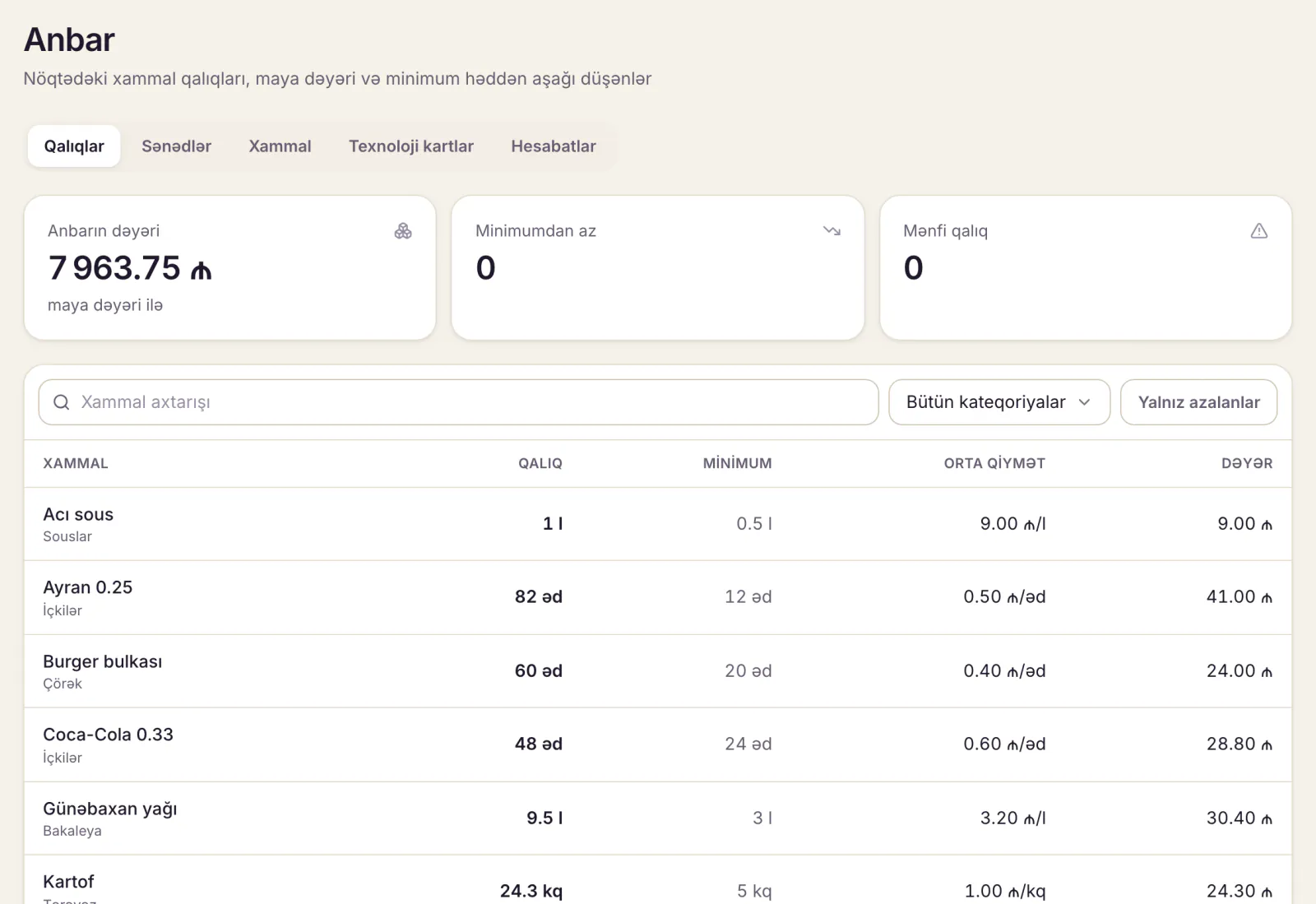
Inventory in Excel: a free template
For a small cafe, Excel is a fine start. Three sheets are enough.
Sheet 1: "Items"
| Code | Ingredient | Unit | Category | Reorder level | Storage |
|---|---|---|---|---|---|
| X001 | Rice | kg | Dry | 14 | Dry store |
| X002 | Beef | kg | Meat | 10 | Fridge |
| X003 | Butter | kg | Dairy | 3 | Fridge |
Sheet 2: "Movements" (one movement per line)
| Date | Type | Doc # | Code | In | Out | Unit price | Amount | Supplier or reason |
|---|---|---|---|---|---|---|---|---|
| 03.11 | Delivery | 145 | X001 | 25 | 3.40 | 85.00 | Supplier A | |
| 05.11 | Write-off | 7 | X001 | 1.5 | Damp |
Sheet 3: "Stock"
| Code | Ingredient | Opening | In | Out | Closing | Reorder level | Status |
|---|---|---|---|---|---|---|---|
| X001 | Rice | 20 | 25 | 33.0 | 12.0 | 14 | Order |
Formulas (in some regional versions of Excel the separator is ";" instead of ","):
- In: =SUMIFS(Movements!E:E, Movements!D:D, A2)
- Out: =SUMIFS(Movements!F:F, Movements!D:D, A2)
- Closing: =C2+D2-E2
- Status: =IF(F2<G2, "Order", "OK")
Where Excel breaks down
- Usage from sales is manual. Every day someone has to multiply portions sold by recipe cards and copy the results in. Miss a day and the stock is wrong.
- One person, one file. The storekeeper, the cook and the manager can't edit at the same time, and versions get mixed up.
- Documents can be quietly changed. Last week's line is easy to edit, and nobody will notice.
Once the menu passes about 40 items or a second branch opens, software saves a lot of time.
If your sheet is already filled in, the work isn’t lost: in Dishment the ingredient list, tech cards and opening stock load from that same file with «Import from Excel» in Back Office. The columns are recognised for you, and rows with errors show up before anything is saved.
Average cost: when prices change between deliveries
You bought rice at 3.20, then at 3.40 manat. What does the rice on the shelf cost? The most practical method for restaurants is the weighted average cost:
Average cost = (value of stock + value of delivery) ÷ (stock + delivery)
Example: (20 × 3.20 + 25 × 3.40) ÷ 45 = (64 + 85) ÷ 45 = 3.31 AZN/kg. At that price the 110 g of rice in a portion of plov costs 0.36 AZN.
The alternative is FIFO ("first in, first out"), where the oldest batch's price is used first. Agree the method in your accounting policy with your accountant; for management, what matters is using the same method every month.
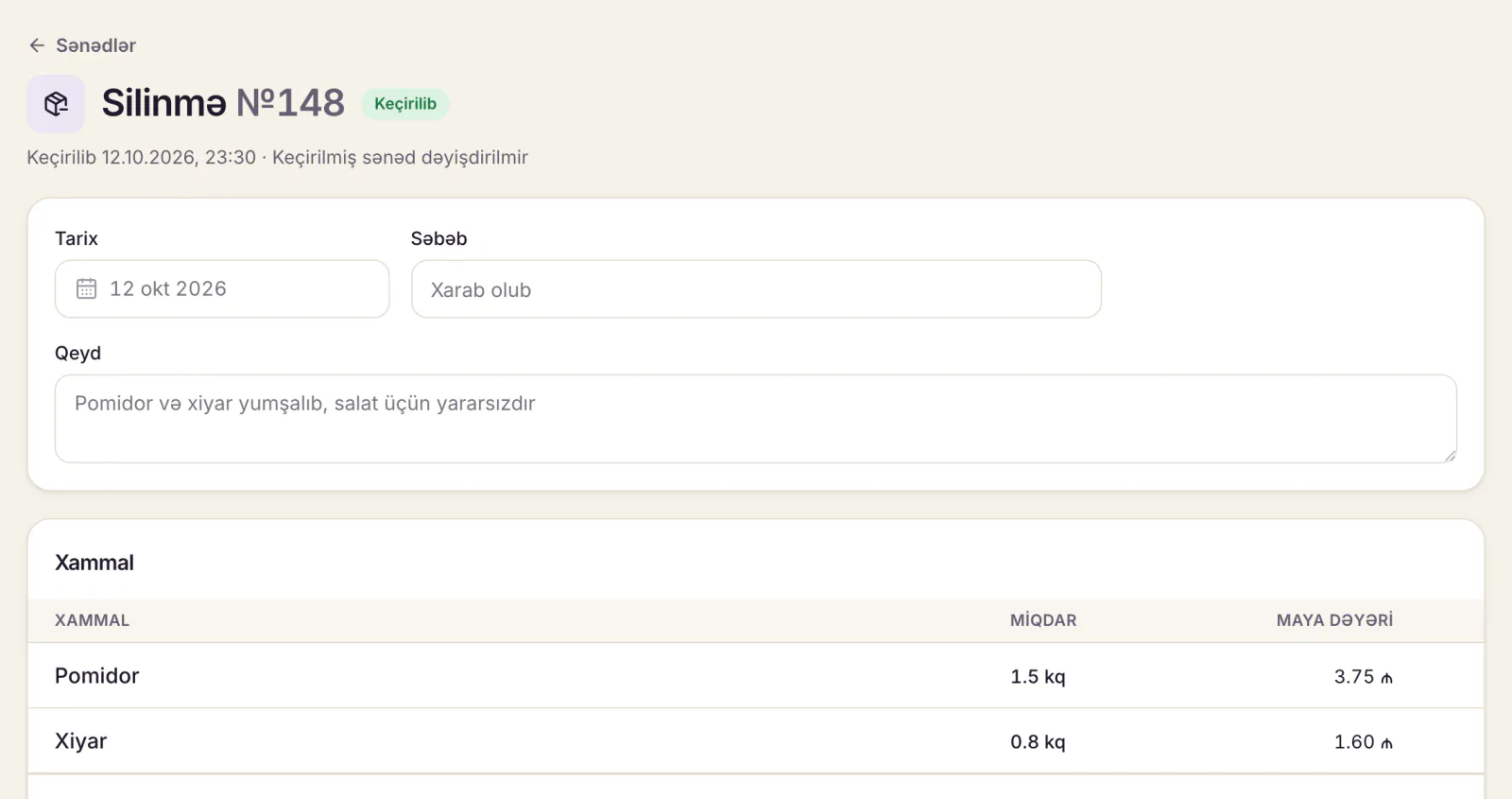
Reorder level: so the rice doesn't run out on Friday
Reorder level = average daily usage × (delivery lead time + safety days)
Example: you use 4.4 kg of rice a day on average, the supplier delivers in 2 days and you keep 1 day of safety stock: 4.4 × (2 + 1) ≈ 13.2 kg. When stock falls below 14 kg, order. Usage rises at weekends and holidays (Novruz, wedding season), so review the level by season.
Common mistakes
- Accepting goods without an invoice. "I'll bring the paperwork tomorrow", and today's stock sits outside the records.
- Mixed units. Herbs counted in bunches one day and kilos the next, so stock never reconciles.
- Dishes without recipe cards. They use ingredients but deduct nothing.
- Unrecorded write-offs. Spoiled meat goes in the bin and looks like theft at the count.
- Editing old documents. Fix a mistake with a reversing document, not by deleting a line.
- Counting once a year. Nobody remembers the reason for a gap found in December.
Inventory software: automatic deduction and recipe cards
Dishment's inventory and recipes module automates most of the steps above:
- goods received with supplier and invoice, write-offs, transfers between locations and stock counts;
- recipe cards with gross weight, waste % and net weight, including for modifiers and combo parts;
- every paid order deducts ingredients by recipe card on its own, with no copying into Excel;
- portion cost is calculated at the average purchase price, and dishes without a recipe card are listed separately;
- items below their minimum stock are flagged in red and trigger a Back Office notification;
- a posted document can't be edited; a mistake is cancelled with a reversing document, so the history stays clean.
Reports on cost of goods sold, gross profit and ingredient usage export to CSV for your accountant. Module terms are on the pricing page.
DISHMENT
Try it free for 30 days
We open the account and move your menu over together. No card needed.
30 days freeFAQ
What is inventory management in a restaurant, in simple terms?
Tracking, with documents, how much of each ingredient came in, how much was used and how much is left. The aim is to know the theoretical stock at any moment and compare it with the actual count.
What do "anbar" and "sklad" mean?
Both mean the storeroom. Anbar is the Azerbaijani word, used in contracts and official papers (anbar uçotu is stock control, anbardar is the storekeeper). Sklad is the Russian word, still common in Baku kitchens.
Can I manage restaurant inventory in Excel?
Yes, a small cafe can start that way. The three-sheet template above is enough. When entering usage from sales by hand every day becomes a burden, switch to software.
Who is responsible for stock control in a restaurant?
One person: a storekeeper or, in a small venue, the manager. The head chef owns recipe cards and kitchen usage; the owner reviews the monthly gaps.
How often should a restaurant count stock?
Expensive and perishable items weekly, everything else monthly. Count items with large gaps more often for a few weeks.
Is inventory management the same as accounting?
No. Inventory management is for running the business day to day: stock, usage, losses. Accounting follows legal requirements. Store-room documents feed the accounts too, so agree their format with your accountant.
Information on documents and tax records is as of October 2026 and is not legal or tax advice. On electronic invoices: taxes.gov.az.