Guides· 12 min read· Dishment team
Food write-offs in restaurants: a write-off log template and how to cut losses
Spoiled, expired, sent-back and staff-eaten food is money too. A copyable food waste log, the usual causes, a monthly write-off rate and moving stock control from Excel to software.
In the morning the cook opens the fridge. Yesterday's chicken breast smells wrong, three litres of milk are past their date, and the lula kebab a guest sent back last night went in the bin. Every one of those was money. The question is where that loss shows up in your food waste log. If it shows up nowhere, the month-end stock count will report a "shortage" and nobody will be able to say where it came from.
This guide walks through food write-offs step by step: what a write-off is and why it happens, a restaurant food waste log template you can copy, where spreadsheet stock control breaks down, how write-offs work in software, and how to track losses with a single number. The examples use a café in Baku and prices in Azerbaijani manat (₼).
What a write-off is and why you record it
A write-off removes from stock something you had on the shelf but did not sell: it went bad or went somewhere other than a sale. When you sell a dish, ingredients are used according to its recipe card. A write-off is everything that is not a sale: rotten tomatoes, a broken bottle, the staff lunch, a burnt qutab, a dish a guest sent back.
There are three practical reasons to record it:
- Your stock count reconciles. A recorded write-off will not appear as an unexplained gap at the next count. An unrecorded one will, and then spoiled chicken and stolen chicken look exactly the same. More on counting: restaurant inventory count.
- Your cost of goods is honest. If you cost your plov only from the recipe card but 2 kg of meat spoil every week, your real food cost is higher than on paper. How to calculate it: food cost calculation.
- You can manage the causes. "Spoiled" once is bad luck. The same product spoiling every week points to order size, storage or the supplier. A write-off without a reason teaches you nothing.
The usual causes of food write-offs
Fix the list of reasons in advance so everyone uses the same words. Nobody wants to add up "spoiled", "gone off" and "bad" at the end of the month.
| Reason | Example | How to reduce it |
|---|---|---|
| Spoilage | Fridge failed overnight, herbs wilted, vegetables rotted | Temperature log, smaller orders, first in, first out |
| Expired | Milk, qatiq (yoghurt), cheese, sauces, prepped items | Date label on every container, morning check |
| Kitchen error | Burnt qutab, overcooked steak, dish sent to the wrong table | Kitchen display, dish notes, standard portions |
| Returned by guest | "Too salty", "cold", dish arrived too late | Record the reason and review it weekly |
| Breakage and spills | A bottle, eggs, spilled flour, a dropped cake | Shelf layout, careful handling |
| Staff meals | Shift lunch, family meal | A separate reason, a set portion and a daily limit |
| Tasting and comps | Testing a new dish, a dessert on the house | Write down who may approve it |
Two rules matter more than the rest:
- Normal prep loss is not a write-off. Onion skins, bones and cooking shrinkage are already in the loss percentage on the recipe card (gross → net). Write them off again and you count the loss twice. How to set it up: restaurant recipe card template.
- An unexplained shortage is not a write-off. If the shelf holds 17 kg of meat instead of 20 and nobody knows why, do not record it as "spoiled". It is a stock count variance and needs its own investigation. Hiding a shortage under write-offs also hides theft: restaurant theft prevention.
A food waste log template: the fields you need
Copy the template below into Word, Excel or Google Sheets and adapt it to your venue. It is an internal operational record: it documents what happened in the kitchen and is the basis for correcting your stock balance.
Header:
- Write-off record no.: 47
- Date: the day the record is made
- Venue and storage area: "Seaside" café, kitchen fridge no. 2 (example)
- Prepared by: cook (name)
- Checked by: shift manager (name)
- Approved by: general manager or owner
The log (figures are examples):
| No. | Item | Unit | Qty | Unit cost, ₼ | Total, ₼ | Reason | Note |
|---|---|---|---|---|---|---|---|
| 1 | Chicken breast | kg | 1.2 | 9.50 | 11.40 | Spoilage | Fridge no. 2 failed overnight, +9 °C in the morning |
| 2 | Milk 3.2% | l | 3 | 2.40 | 7.20 | Expired | Found at the morning check |
| 3 | Tomatoes | kg | 2.5 | 3.20 | 8.00 | Spoilage | Batch ordered too large |
| 4 | Lamb mince for lula kebab | kg | 0.25 | 22.00 | 5.50 | Returned by guest | Table 7, "too salty" |
| 5 | Red wine 0.75 l | pcs | 1 | 18.00 | 18.00 | Breakage | Fell off the shelf |
| 6 | Rice | kg | 0.8 | 3.60 | 2.88 | Staff meal | Plov for a shift of 4 |
| Total | 52.98 |
Signatures: Prepared ______ · Checked ______ · Approved ______
How to fill it in:
- Record it the same day. Keep a short waste sheet in the kitchen during the day and complete the record at the end of the shift. A record written from memory at the end of the week is a guess.
- Weigh it. Not "half a box of tomatoes" but "2.5 kg".
- Value it at cost, not at menu price. The chicken cost you 9.50 ₼ per kg; what the dish sells for is irrelevant here.
- One reason per line. If part of a product spoiled and part went to the staff lunch, that is two lines.
- Two signatures. Whoever records the write-off does not approve it alone.
- Take a photo. For expensive items (meat, fish, alcohol) a phone photo saves a lot of questions later.
How do you write off a finished dish, say three portions of plov? Your stock holds ingredients, not dishes, so a finished dish is broken down into ingredients using its recipe card: if a portion contains 250 g of rice, three portions mean 0.75 kg of rice plus the meat, oil and everything else.
Stock control in Excel: where it breaks
Small cafés often start with a spreadsheet, and for the first months it works: one sheet for deliveries, one for write-offs, one for balances. Problems arrive as you grow:
- Write-offs are not linked to balances. The record is on one sheet, the balance on another. Someone fills in the record and forgets to update the balance.
- Sales do not consume stock. The spreadsheet does not know you sold 80 portions of plov today, so the theoretical balance has to be worked out by hand, and nobody does that every day.
- Prices go stale. Meat gets dearer every month while the file still holds last quarter's price, so the value of your write-offs is wrong.
- There is no history. Any line can be edited or deleted and nobody knows who did it or when.
- The file lives on one computer. The manager cannot check it from home, and when two people open it, versions diverge.
- Month-end totals. Summing write-offs by reason costs someone an evening.
None of this means spreadsheets are "bad". Stock control simply goes wrong less often when write-offs, sales, balances and costs are linked automatically.
DISHMENT
Try it free for 30 days
We open the account and move your menu over together. No card needed.
30 days freeIf your sheet is already filled in, the work isn’t lost: in Dishment the ingredient list, tech cards and opening stock load from that same file with «Import from Excel» in Back Office. The columns are recognised for you, and rows with errors show up before anything is saved.
Write-offs in software: how Dishment handles them
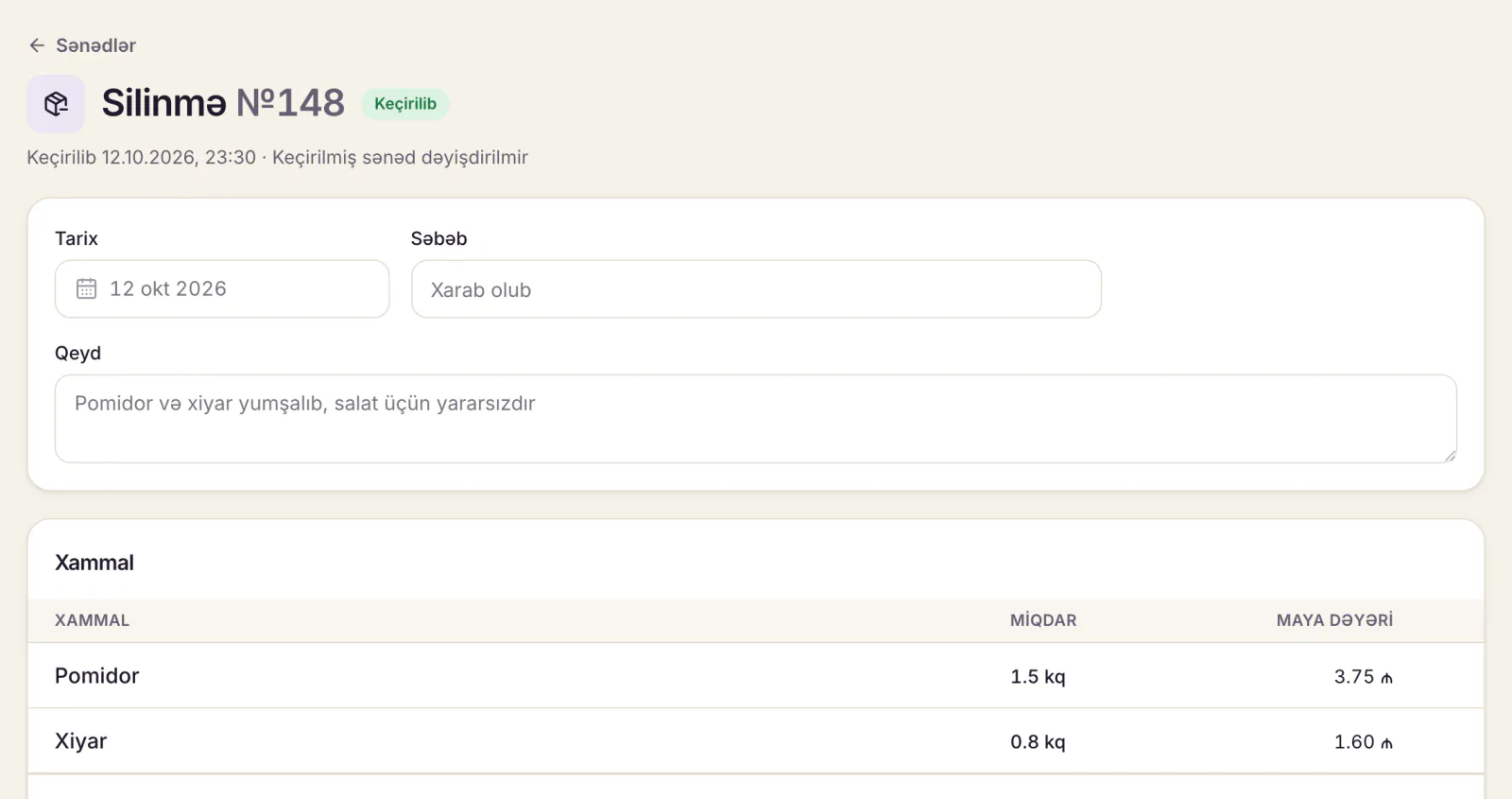
In Dishment's Inventory and recipes module, a write-off is its own stock document. Here is exactly how it works, so your expectations are right.
Sales deduct stock automatically. Every paid order deducts ingredients according to the dish's recipe card. Voided items and orders made in training mode do not touch stock.
So a dish that was cooked and then voided is written off by hand. If a lula kebab was cooked and the item was then voided, the meat was really used, but there was no sale, so the system did not deduct it. That is a job for a write-off document. The Voids report shows, for each void, the reason, who did it and whether the item had already gone to the kitchen, which makes it easy to find the voids that cost you real food.
Recording a write-off:
- In Back Office: Inventory → Documents → New document → Write-off.
- Enter the date, the reason and an optional note.
- Add ingredients and quantities. Each line's value at cost is calculated for you from the venue's average purchase price.
- Save it as a draft or press Post. Balances change the moment it is posted.
One document, one reason. The reason field applies to the whole document. Post spoilage, staff meals and breakage as separate documents, and later you can see at a glance what each reason cost.
A posted document never changes. If there is a mistake, you cancel it: the system creates a reversing document that undoes every movement, and both stay in the history. Only staff with that permission can post documents (by default, managers and above).
Reports. The Consumption report shows, for each ingredient over the period you choose: used in sales, written off, stock count variance and total use. You can export it to CSV for your accountant. Each ingredient's movement history lists every sale and every document with its date.
Minimum stock. Ingredients running low are highlighted in red. That does not cut write-offs directly, but it breaks the habit of ordering "just in case", which is where much spoilage comes from.
Losses at the till (voids after the bill was printed, reopened checks, cash shortages) are picked up separately by the Loss prevention module.
The monthly write-off rate: one number to watch
A long list of write-offs is hard to read every month. Pick one indicator and calculate it the same way every month:
Write-off rate = cost of write-offs ÷ cost of goods sold × 100
Example (illustrative figures): over a month a café sold 18,000 ₼ of food at cost and wrote off 540 ₼. Write-off rate: 540 ÷ 18,000 × 100 = 3%. With monthly revenue of 60,000 ₼, that is 0.9% of revenue.
Then split the same amount by reason:
| Reason | Amount, ₼ | Share |
|---|---|---|
| Spoilage | 210 | 39% |
| Expired | 120 | 22% |
| Kitchen errors and returns | 90 | 17% |
| Staff meals | 80 | 15% |
| Breakage | 40 | 7% |
| Total | 540 | 100% |
The decision is obvious: 61% of the loss is spoilage and expiry, so start with order sizes and storage, not with telling the chef off.
Do not borrow a "benchmark" from the internet; figures vary widely with concept, menu and supply. Measure your own rate for two or three months, then set a target and compare against it monthly. Track the stock count variance separately: a write-off is an explained loss, a variance an unexplained one, and they should never be blended into one number. How write-offs hit profit: restaurant profit margin. Which dishes deserve a place on the menu at all: restaurant menu engineering.
Common mistakes
- Recording from memory at month end. Nobody remembers exactly what spoiled a month ago.
- Valuing at menu price. Losses look inflated and people stop trusting the number.
- Recording a shortage as spoilage. The problem hides and comes back next month.
- Writing off normal prep loss a second time. It is already in the recipe card.
- Not recording staff meals. Four lunches a day is more than a hundred portions a month.
- Turning write-offs into a punishment. If every recorded write-off is deducted from someone's pay, people will simply stop recording them, and you are back to unexplained gaps.
FAQ
Who should sign a write-off record?
At least two people: whoever prepares it (usually the cook or storekeeper) and whoever checks it (the shift manager). For expensive items a third signature from the owner or general manager helps. Agree the official form for your accounts with your accountant.
Where can I get a food waste log template in Excel or Word?
Copy the table above and paste it into Excel, Word or Google Sheets; the columns are ready. Add your venue name and signature lines to the header and fix the list of reasons in advance.
How often should we record write-offs?
Note them during the day and complete the record at the end of every shift or day. A weekly or monthly catch-all record loses the reasons.
What is the difference between a write-off and a stock count variance?
A write-off is a loss with a known reason, recorded when it happens. A variance is a gap with no known reason, revealed by a count. The first shows how your process works; the second shows how well it is controlled.
Is a spreadsheet enough for stock control?
For a small single-site café at the start, yes. But until sales deduct stock automatically, you will have to work out the theoretical balance by hand every time. Once the menu grows or a second site opens, software saves real time. See the module terms on the pricing page.
Information as of October 2026. This is not accounting or tax advice.
DISHMENT
Want to see this in your restaurant?
We'll show you Dishment on your own menu in 30 minutes.
Free demo