Technology· 11 min read· Dishment team
What is a POS system? POS system vs POS terminal vs cash register for restaurants
What a POS system is in plain words, how it differs from a card terminal and a fiscal cash register, how an order flows through it in a restaurant, and a checklist for choosing one.
Everyone in a restaurant says "POS", but they rarely mean the same thing. To a waiter it is the little card machine; to the accountant it is the fiscal till; to the owner it is the software that runs the whole floor. So what is a POS system, really, and how is it different from a POS terminal or a cash register?
This guide explains the POS system in plain words, compares the three in one table, follows an order through a restaurant POS step by step, and ends with a checklist for choosing one. Examples are from Azerbaijan, where a fiscal cash register (NKA, or e-kassa) is a legal requirement.
What is a POS system, in plain words
POS stands for point of sale. A POS system is the combination of software and hardware that works where the sale happens: it takes the order, builds the bill, records the payment and writes every sale into reports. In a restaurant it also covers tables, kitchen tickets, the menu, staff and stock.
So a POS system is not one device. Software sits at the centre, surrounded by a till computer, waiter tablets, printers and a kitchen screen.
POS system vs POS terminal vs cash register
All three can sit on the same counter, but they do very different jobs.
- A POS terminal accepts bank cards. A bank (the acquirer) connects it under a contract and the money goes through the bank.
- A fiscal cash register (NKA, e-kassa) prints the fiscal receipt and sends every receipt to the tax authority. In Azerbaijan it is mandatory in catering and is installed only through a registered e-kassa operator.
- A POS system runs the business: who ordered what and when, when the kitchen made it, which dish makes money.
| POS system | POS terminal | Cash register (NKA) | |
|---|---|---|---|
| Main job | Orders, kitchen, bill, reports | Card payment | Fiscal receipt, reporting to tax |
| Supplied by | Software company | Bank | Registered e-kassa operator |
| Required by law | No, it's a management tool | For certain businesses, yes | In catering, yes |
| Tables and orders | Yes | No | No |
| Kitchen tickets | Screen or printer | No | No |
| Stock and food cost | Yes (as a module) | No | No |
| What the guest gets | A bill (not fiscal) | Card slip | Fiscal receipt |
We cover the NKA in more depth in fiscal cash register vs restaurant POS, and hardware prices in cash register and POS terminal prices in Azerbaijan.
How a POS system works: from order to report
Let's follow one table. Thursday evening, four guests at table 4.
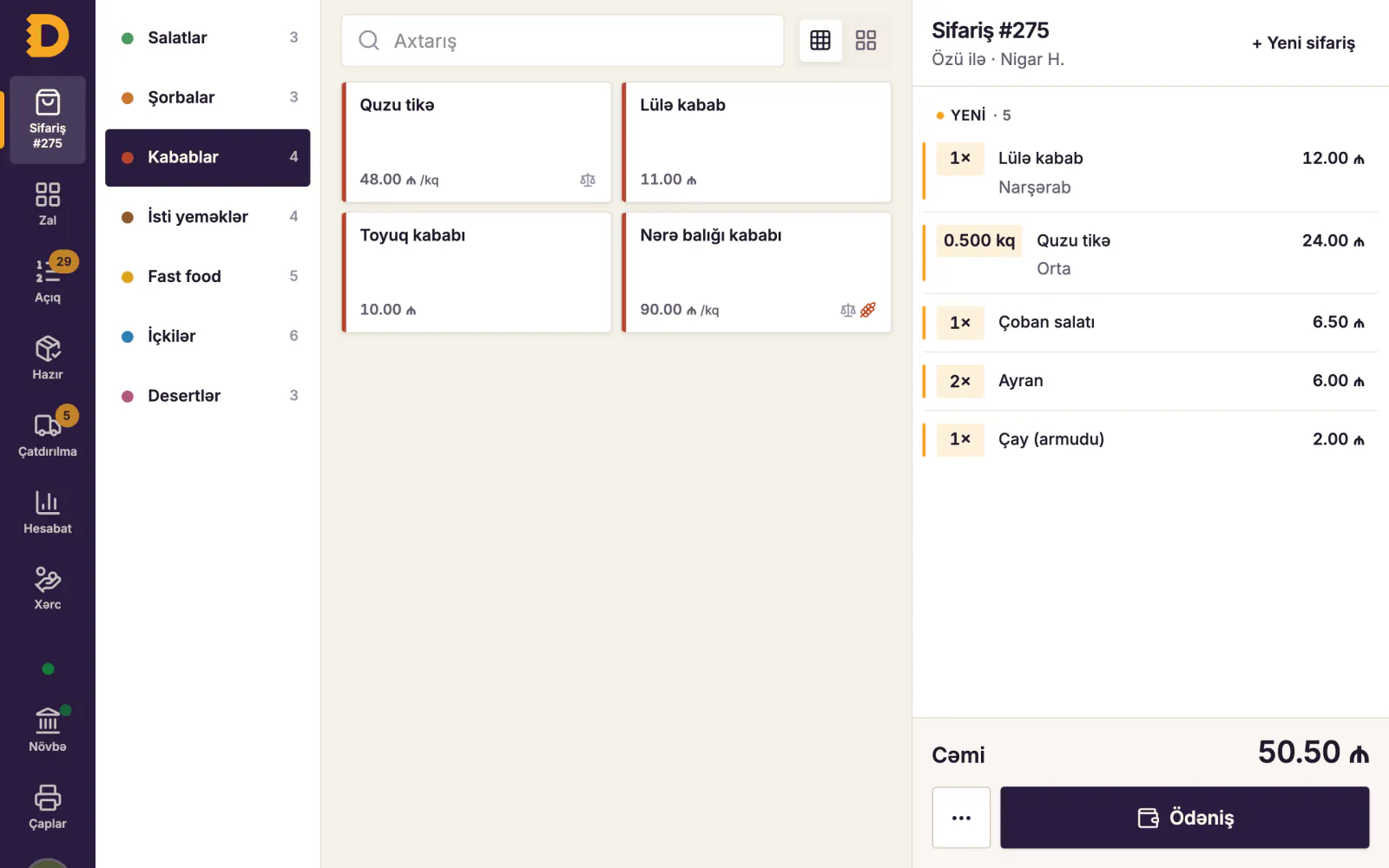
- The table is opened. The waiter picks it on the floor plan on a tablet. It turns "occupied", and the manager sees that from the till.
- The order. Two portions of plov, herb qutab, dovga and a pot of tea. "No onion" is added to the qutab with one tap.
- The order goes to the kitchen. Plov to the hot-line screen, qutab to the printer by the tandoor, tea to the bar. Each ticket shows a timer.
- The kitchen marks it ready. The waiter sees it straight away, and nobody gets cold qutab.
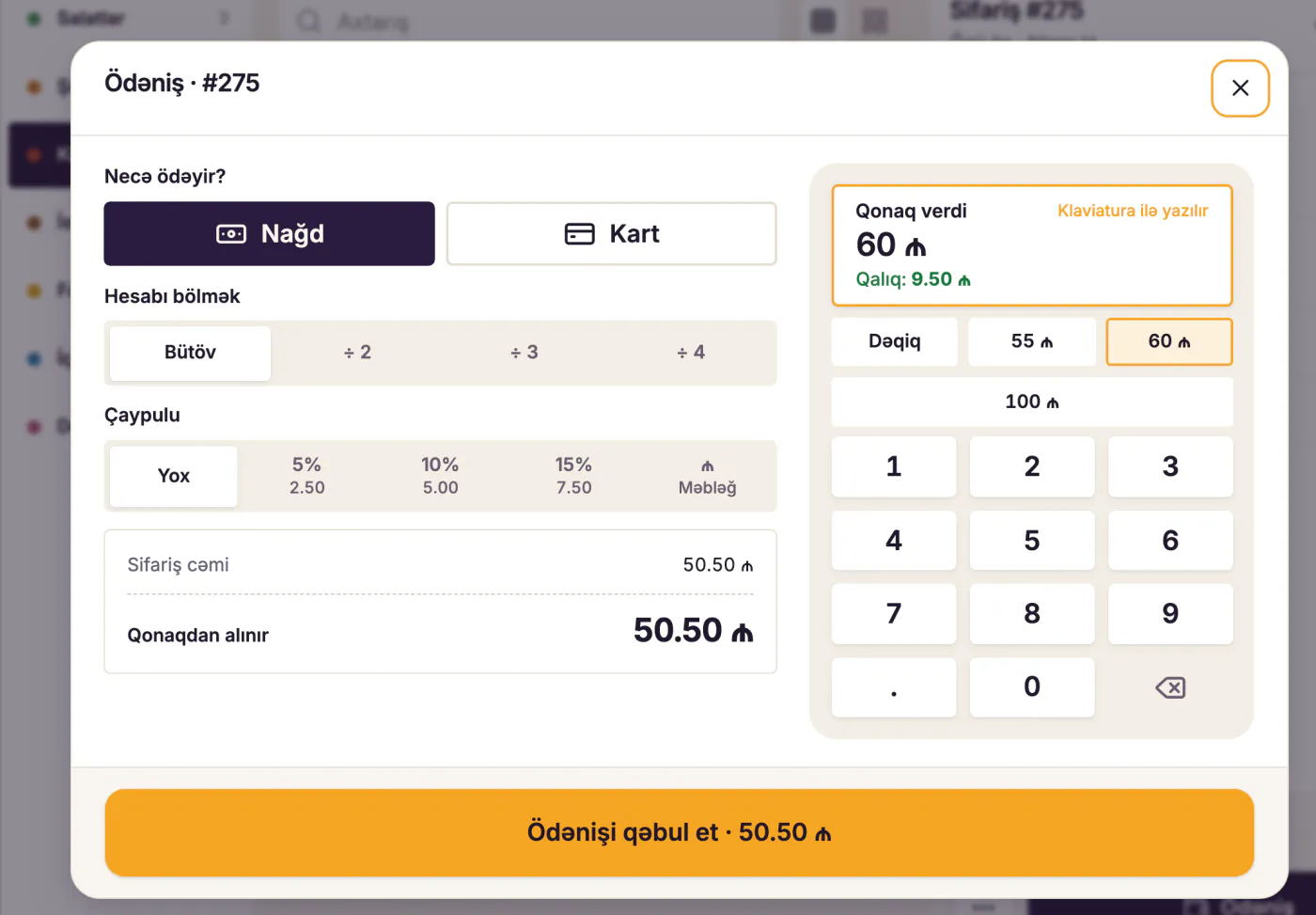
- The bill. The guests want to pay separately. The check is split in two and each sees their share.
- Payment. One pays cash, the other by card. The card goes through the bank's POS terminal, the venue's cash register issues the fiscal receipt, and in the POS system the check is closed with the payment method.
- Stock and reports. The plov sold deducts rice, meat and oil from stock by its recipe card. In the evening the owner sees the day's revenue, top dishes and voids on a phone.
The POS system is where all of this comes together. The terminal and the register each do their own part: one reads the card, the other prints the tax receipt.
What a POS system is made of
| Part | What it does | Minimum setup |
|---|---|---|
| Till | Bill, payment, shift | Windows computer or Android tablet |
| Waiter tablet | Orders at the table | Android tablet or phone |
| Kitchen screen or printer | Tickets by station | Tablet, screen or ESC/POS printer |
| Receipt printer | Prints the bill | Thermal printer |
| Back office | Menu, prices, reports | Web browser |
| Local server (in some systems) | Working offline | A computer in the venue |
Cloud vs local POS: what happens when the internet drops
POS systems differ by where the data lives:
- Local POS. Everything runs on a computer in the venue. No internet needed, but the owner can't see reports from home, and a broken computer puts the data at risk.
- Cloud POS. Everything lives on a server online. Reports work from anywhere and updates arrive on their own. The downside: without internet the till, kitchen and printing may stop.
- Hybrid POS. A local server (a hub) runs in the venue and syncs with the cloud. When the internet drops, orders and payments carry on; when it returns, everything syncs.
| Local | Cloud | Hybrid | |
|---|---|---|---|
| Selling offline | Yes | Often not | Yes |
| Reports from home | No or awkward | Yes | Yes |
| Updates | Manual | Automatic | Automatic |
| If the computer dies | Data can be lost | No effect | Data stays in the cloud |
In Baku the internet can drop at the worst moment, from a provider fault or a short power cut. Ask the vendor to unplug the cable during the demo and watch what happens. More in offline POS for restaurants.
POS systems by venue type
- Table-service restaurant: floor plan, waiter tablets, courses (starters first, then mains), split bills.
- Cafe and tea house: a fast till, tables or a counter, a simple menu for tea sets and sweets.
- Fast food and coffee shop: counter mode, order numbers, a kitchen screen and a "ready" screen for guests.
- Chain: a shared menu, prices per branch, a combined report.
What a restaurant POS system should have: a checklist
Go through this list with every vendor:
- Do orders, the kitchen and payments keep working offline?
- Is there a live floor plan with table status?
- Do orders go to the kitchen by station (screen or printer)?
- Is it easy to split or merge a check and move a table?
- Do voids require a reason and land in an audit log?
- Does every sale deduct ingredients by recipe card?
- Can you open reports on a phone or in a browser?
- Are the interface and receipts available in Azerbaijani, Russian and English?
- Does it work with ordinary Android tablets and any ESC/POS printer?
- Is there a fee per tablet or till?
- How does it work alongside the fiscal register and the bank terminal?
- Can you export your data if you leave?
For a fuller comparison, see how to choose restaurant management software.
POS terminal rules in Azerbaijan
- The terminal is connected under a bank contract. Under the Cabinet of Ministers rules on POS terminals, the terminal may belong to the business or to the bank, and the bank charges a per-transaction fee agreed in the contract.
- No surcharge for card payments. The same rules put this commitment into the contract with the bank.
- Refusing cards can mean fines. According to the State Tax Service, not installing a POS terminal where it is mandatory, or refusing cashless payment, carries a penalty of 1,000, 3,000 and 6,000 AZN within a calendar year.
- The 2026 tax benefit depends on integration. A catering business on the 8% simplified tax pays 6% on cashless payments, provided they go through a POS terminal integrated with the cash register. Details: restaurant taxes in Azerbaijan 2026.
Note that this is about the link between the bank terminal and the cash register. The restaurant's POS system does not affect it.
Common mistakes
- Confusing the POS system with the cash register. People buy software and forget the NKA, or the other way round. You need both; they do different jobs.
- Looking only at the price. A cheap system that stops offline eats all the savings in one Friday night.
- Leaving waiters out of the demo. They use the system a hundred times a shift and will spot how many taps a note or a split bill takes.
- Forgetting the kitchen. The floor side may be great, but if tickets reach the kitchen in a jumble, guests wait.
- Putting reports off. If the menu and recipe cards aren't set up from day one, you won't know your food cost at month end.
How the Dishment POS system works
Dishment is a hybrid POS system built for restaurants in Azerbaijan. The till runs on a Windows computer, an Android tablet or in a browser, and waiters take orders on an Android tablet or phone. A hub, the local server, runs on the venue's main Windows computer: when the internet drops, orders, kitchen tickets, payments and printing keep going, and everything syncs to the cloud once the connection is back. Owners open the Back Office in any browser.
The base plan includes the POS, waiter tablets, the kitchen display, offline mode, the menu and reports. Stock, QR menu and other modules are added when needed. Dishment does not issue fiscal receipts and is not integrated with cash registers or bank terminals; it works alongside the venue's NKA and terminal.
DISHMENT
Want to see this in your restaurant?
We'll show you Dishment on your own menu in 30 minutes.
Free demo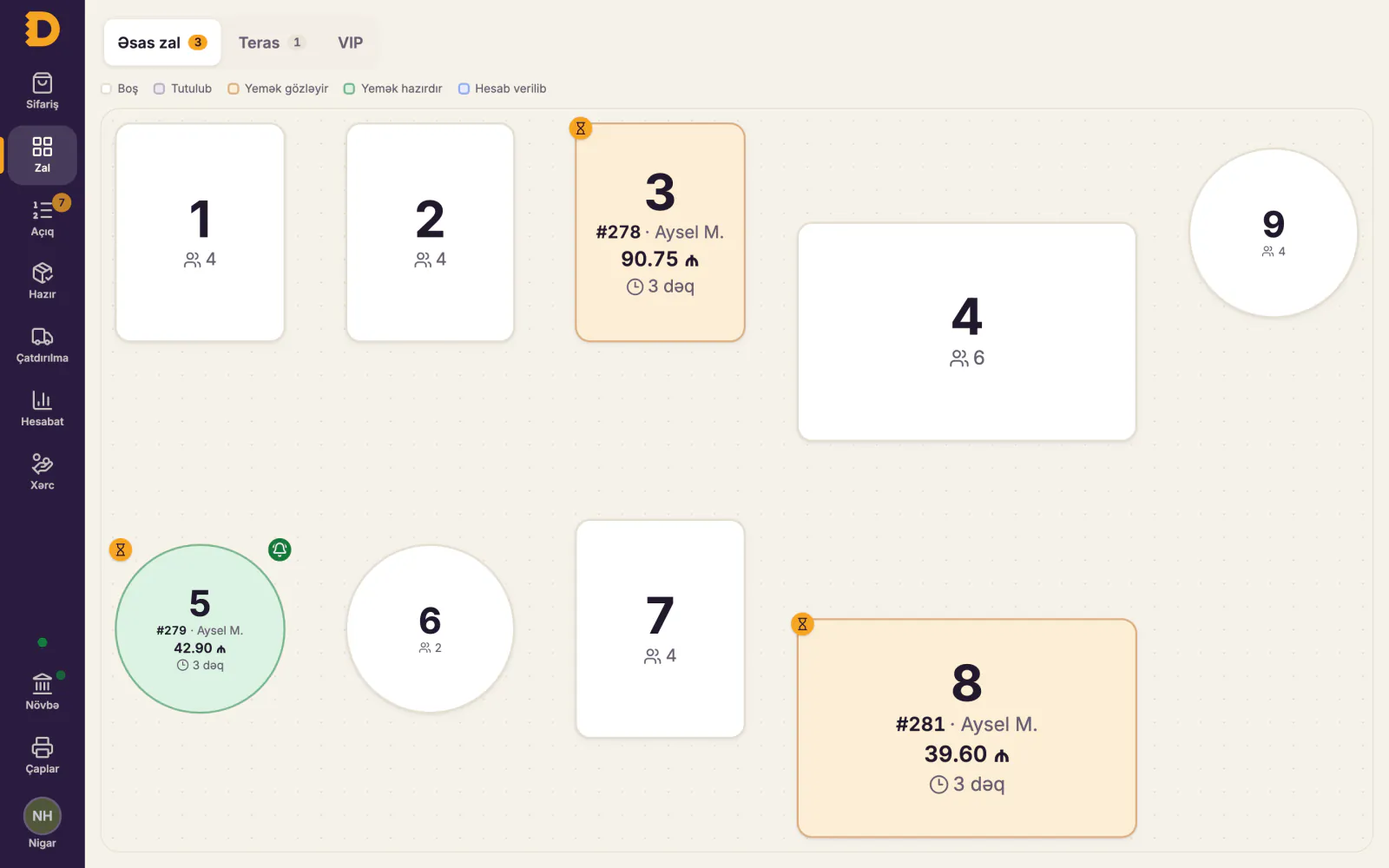
FAQ
What does POS mean?
Point of sale. In everyday speech the word covers both the bank card terminal and the software that runs sales. In a restaurant, "POS system" usually means the software that ties together orders, the kitchen, payments and reports.
What is a POS terminal?
A device that accepts bank cards. A bank connects it under a contract and takes a commission on each transaction. It knows nothing about orders, tables or the kitchen.
Does a POS system replace a cash register?
Not in Azerbaijan. The fiscal cash register (NKA) prints the fiscal receipt and is required by law. A POS system is a management tool that works alongside it.
Does a cloud POS work without internet?
It depends. A purely cloud system may stop. A hybrid system keeps working thanks to the local server in the venue. Test this in the demo.
Does a small cafe need a POS system?
Even with one till it saves time: orders reach the kitchen without mistakes, voids are visible, and the day's report is ready at closing. One computer, one printer and one tablet are enough to start.
What is an adisyon?
Adisyon is a Turkish word for a table's bill, the order a waiter opens for a table. In Turkey restaurant software is called an "adisyon programı"; in Baku the same thing is usually called POS software or a POS system. In Dishment the waiter opens the table's bill on a tablet, dishes go to the kitchen, and the bill is closed at the till.
The card terminal is not working: what should I do?
First switch the terminal off and on, and check the cable, the Wi-Fi or the SIM signal. If that does not help, call the bank's support line; the number is usually on the terminal or in the contract. If the terminal is integrated with the NKA, tell your e-kassa operator as well. If a payment froze halfway, do not charge the card a second time until the bank confirms whether the first transaction went through.
Sources
- State Tax Service, online cash register booklet, 2026 (financial penalties): taxes.gov.az
- State Tax Service, simplified tax booklet, 2026 (integrated POS terminal condition): taxes.gov.az
- Cabinet of Ministers Decision No. 219 of 4 October 2012, rules on POS terminals: nk.gov.az
Legal information as of October 2026; this is not legal or tax advice. For your situation, ask your accountant, your bank or the State Tax Service.